Contemporary Brush ii: Mixed Abstract Art Tools
Creating authentic textures in digital art often feels like chasing a ghost. You want the grit of dry paint, the fluidity of a watercolor wash, or the chaotic energy of a grunge overlay, but standard vector tools can sometimes feel too clean, too perfect, and ultimately too sterile. This is where Contemporary Brush ii steps in to bridge the gap between digital precision and organic chaos. It is not just a collection of strokes; it is a toolkit designed to bring the tactile feel of physical media into the vector environment of Adobe Illustrator.
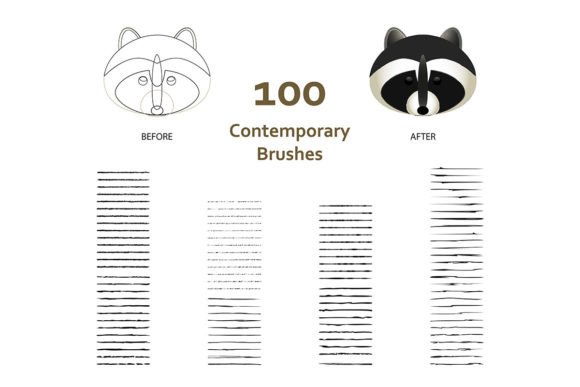
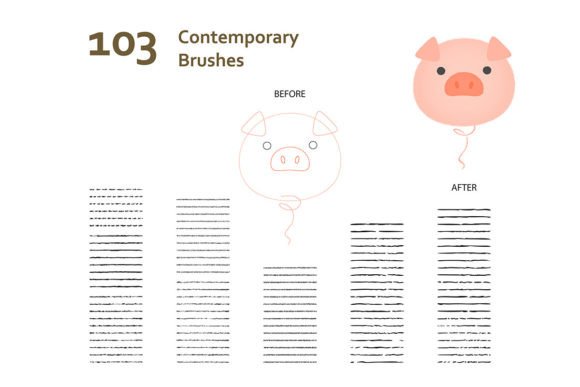
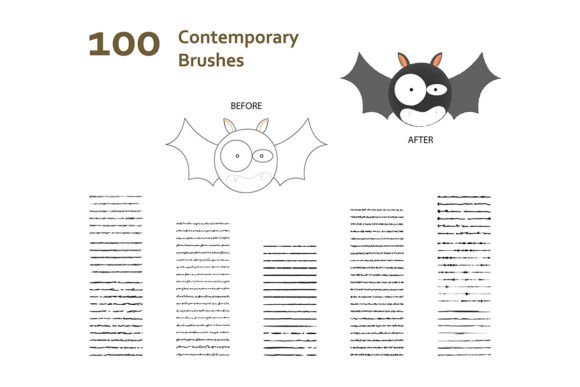
This resource offers 100 distinct brushes that are fully compatible with Adobe Illustrator CS6 and later versions, formatted as AI EPS files for maximum versatility. From the soft edges of a storybook illustration to the jagged lines of a modern cartoon, these tools allow creators to inject personality into their work without leaving the vector workspace. Whether you are sketching a quick idea or finalizing a complex layout, the right brush set can transform a flat design into a piece with depth and history.
What Makes Contemporary Brush ii Different?
At its core, Contemporary Brush ii focuses on mixed abstract contemporary aesthetics. Unlike traditional calligraphy or solid line brushes, this set mimics the behavior of real-world materials. The collection includes specific styles for blob doodles, which add playful, irregular shapes to designs, and grunge effects that introduce wear and tear to give an image a vintage or distressed look.
The inclusion of dry paint textures is particularly notable. In digital design, achieving a "dry" look—where pigment sits on top of the surface rather than soaking in—is notoriously difficult. These brushes replicate that resistance, creating broken lines and textured fills that suggest age and character. Furthermore, the set provides specialized frame borders, allowing users to contain their artwork within custom, hand-drawn perimeters that match the internal aesthetic perfectly.
Because these brushes are AI EPS compatible, they remain scalable. You can resize a sketched border from a small business card to a massive billboard without losing resolution or introducing pixelation. This technical reliability ensures that the artistic intent remains intact regardless of the output size.
Perspectives for Beginners and Hobbyists
For those just starting their journey in digital illustration, the barrier to entry can be high. Learning how to manually create textures using pen tools or raster effects takes time and practice. Contemporary Brush ii lowers this barrier significantly. Beginners can achieve professional-looking results almost immediately by selecting a pre-made texture that matches their vision.
A hobbyist working on a personal project, such as a children's storybook, might use the illustration and cartoon brushes to create whimsical characters. Instead of spending hours trying to make a line look "wobbly" or "hand-drawn," they can simply apply a blob doodle brush to create fun, organic shapes. This immediate gratification helps maintain motivation and allows new artists to focus on composition and storytelling rather than getting bogged down in technical texture creation.
For the casual creator, the value lies in speed and ease of use. The ability to drag and drop a grunge effect onto a background saves hours of manual labor. It turns a potentially frustrating learning curve into an enjoyable creative process, making digital art accessible to anyone with a basic understanding of Adobe Illustrator.
Strategic Value for Professionals and Freelancers
While beginners seek ease, professionals prioritize efficiency and consistency. For a freelance illustrator or a graphic designer working under tight deadlines, time is currency. Contemporary Brush ii serves as a productivity multiplier. Instead of building a unique texture library from scratch for every client, a professional can rely on this curated set to deliver high-quality, varied results quickly.
Consider a marketing team needing assets for a campaign that requires a "rough around the edges" vibe to appeal to a younger demographic. A designer can utilize the mixed abstract brushes to generate social media graphics, ad banners, and presentation slides that feel cohesive yet dynamic. The sketch brushes are particularly useful for wireframing ideas that need to look polished enough to present to stakeholders but retain a conceptual feel.
For entrepreneurs and small business owners managing their own branding, these tools offer a cost-effective solution. Hiring an artist to create custom vector textures for a logo or packaging can be expensive. By integrating Contemporary Brush ii into their workflow, business owners can maintain a consistent brand identity that feels artisanal and bespoke without the associated costs. The commercial value extends to the longevity of the files; since they are vector-based, the assets created today will still be editable and high-quality years from now.
Educational and Creative Applications
Art educators and workshop leaders often struggle to find resources that demonstrate the transition from traditional to digital media effectively. Contemporary Brush ii acts as an excellent teaching aid. Educators can use the dry paint and grunge brushes to show students how digital tools can mimic physical constraints. This helps learners understand concepts like texture, opacity, and layering in a visual context.
In a classroom setting, teachers can assign projects where students must combine different brush types to tell a story. For instance, a student might use frame borders to define a comic panel and then fill it with blob doodle elements to represent clouds or smoke. This encourages experimentation and helps students develop a unique visual voice. The variety within the 100-brush collection ensures that there is something for every style, from minimalist sketches to dense, layered compositions.
Furthermore, the compatibility with older versions of Illustrator (CS6 and above) makes this tool inclusive for schools or institutions that may not have the latest software licenses. It ensures that educational access is not limited by budget constraints, allowing more students to explore advanced digital techniques.
Evaluating Fit for Your Projects
Deciding whether Contemporary Brush ii is the right tool depends on your specific goals and current workflow. If your primary need is crisp, corporate geometric design, these brushes might be less relevant. However, if your work involves storytelling, character design, or any project requiring a human touch, this collection is likely a strong match.
Ask yourself a few questions before integrating these tools:
- Do I need variety? With 100 brushes, the set covers a wide range of needs, from subtle texture to bold statement pieces.
- Is scalability important? If you print large formats or need assets for multiple screen sizes, the vector nature of these brushes is essential.
- Am I looking for speed? If you need to prototype ideas quickly, the pre-made textures save significant time compared to manual creation.
- Does my software support it? As long as you are running Adobe Illustrator CS6 or newer, you are ready to go.
Ultimately, the value of Contemporary Brush ii lies in its flexibility. It does not dictate a single style but rather provides the raw materials for you to build your own. Whether you are a marketer crafting a viral campaign, a writer illustrating a novel, or a hobbyist exploring a new medium, these brushes offer a reliable foundation for bringing abstract ideas to life. They transform the digital canvas from a sterile grid into a space where creativity can breathe, stumble, and thrive just like it does in the physical world.