Stars Procreate Brush Pack: A Practical Evaluation for Digital Artists
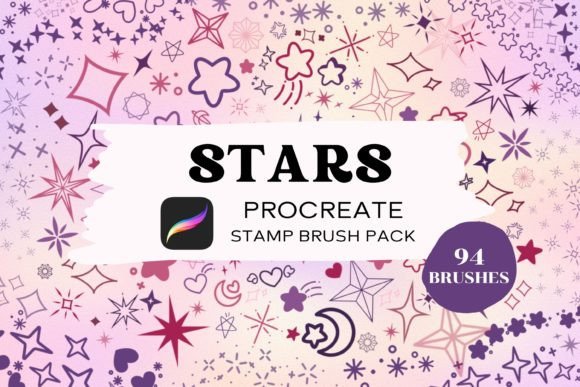
In the ecosystem of digital illustration, the efficiency of a workflow is often determined by the quality and versatility of the available assets. For artists using Apple's iPad and the Procreate application, custom brush sets are not merely decorative additions; they are functional tools that can significantly accelerate production times while maintaining high aesthetic standards. The Stars Procreate Brush Pack represents one such resource, offering a curated collection designed to streamline the creation of celestial motifs, sparkles, and glowing effects. With a total of 94 distinct stamp brushes, this pack targets professionals and serious hobbyists who require consistent, scalable elements without the overhead of drawing them from scratch for every project.
The primary value proposition of this specific brush set lies in its adaptability. Unlike static image files that must be imported as overlays, these brushes function natively within the Procreate engine. This distinction is critical for artists working on complex compositions where blending modes, opacity adjustments, and color variations are required. Whether an illustrator is designing a fantasy book cover, creating social media graphics, or developing texture maps for game design, the ability to manipulate these star stamps dynamically offers a level of control that raster images cannot match.
Technical Specifications and Asset Quality
At its core, the Stars Procreate Brush Pack delivers 94 unique stamp configurations. In the context of digital art, a "stamp" brush captures a single instance of a shape—in this case, various iterations of stars—and allows the user to place it repeatedly with a single tap or stroke. The variety within the pack is substantial, ranging from simple geometric five-pointed stars to more intricate, multi-layered designs that simulate twinkling light or magical dust.
A key characteristic of high-quality stamp brushes is their resolution and edge definition. Upon evaluation, the brushes in this pack demonstrate clean vector-like edges that remain sharp even when resized significantly. This scalability is essential for projects requiring both microscopic details and large-scale focal points. For instance, an artist might use a small star stamp to create a background galaxy effect and then scale up a larger variant for a central logo element. The consistency of the line weight and clarity across different sizes indicates a well-optimized source file, ensuring that the final output does not suffer from pixelation or blurring.
Furthermore, the pack supports full customization regarding color and opacity. Because these are native Procreate brushes rather than PNG overlays, users can apply any color from the palette, adjust the flow settings, and utilize blending modes such as "Add," "Screen," or "Overlay" to integrate the stars seamlessly into the artwork. This flexibility transforms the pack from a simple library of shapes into a dynamic lighting tool. An artist can, for example, set the blend mode to "Add" and use a bright yellow hue to create a glowing effect that interacts realistically with darker background layers.
Workflow Integration and Installation Process
The utility of any digital asset is contingent upon how easily it integrates into an existing workflow. The Stars Procreate Brush Pack follows the standard import protocol for Procreate, which is generally straightforward but requires adherence to specific steps to ensure compatibility. The process begins with the acquisition of the .brushset file. Once downloaded, the file must be transferred to the iPad where Procreate is installed.
For most users, the installation is immediate. After tapping the downloaded file on the iPad, the system prompts to open the content in Procreate, automatically importing the entire set into the app's brush library. However, technical friction can occur depending on the iOS version or the method of download. If the automatic import fails, the recommended workaround involves downloading the file to a computer first and transferring it via AirDrop to the iPad. This step ensures the file integrity remains intact before opening it in the application.
It is also imperative to verify that the Procreate application is updated to the latest version. Older versions of the software may not support certain brush parameters or the newer .brushset format, leading to import errors. Ensuring the software environment is current is a prerequisite for utilizing the full potential of this pack. Once installed, the brushes appear as a new folder within the brush library, organized for easy access. This organization aids in maintaining a tidy workspace, allowing artists to locate specific star shapes quickly during the creative process.
Practical Applications in Professional Projects
The versatility of the Stars Procreate Brush Pack extends across several professional domains. For illustrators working in children's literature or fantasy genres, the inclusion of varied star shapes provides an efficient way to populate night skies and magical environments. Instead of spending hours hand-drawing individual stars, an artist can select a few variants from the pack and scatter them across the canvas, varying the size and opacity to create depth and atmosphere.
Graphic designers and marketers also find significant value in these assets. Social media content often requires eye-catching visuals that convey themes of excellence, magic, or celebration. The ability to generate high-quality starbursts and sparkle effects instantly allows for rapid prototyping of ad creatives, blog headers, and promotional materials. The pack's compatibility with all colors means it can be adapted to fit specific brand guidelines, whether the project requires a monochromatic scheme or vibrant, contrasting hues.
Additionally, educators and content creators producing tutorials or educational materials can leverage these brushes to highlight key points or add visual interest to diagrams. The non-intrusive nature of the smaller stamp brushes makes them ideal for subtle embellishments that enhance readability without distracting from the core content. In scenarios where time is a constraint, such as meeting tight deadlines for client deliverables, the efficiency gained from using pre-made, high-quality assets like the Stars Procreate Brush Pack can be a decisive factor in project success.
Limitations and Compatibility Considerations
While the Stars Procreate Brush Pack offers considerable advantages, it is important to acknowledge its limitations to manage expectations effectively. The most significant constraint is platform exclusivity. These brushes are compatible only with the Procreate application on iPad devices. They cannot be used on Android tablets, desktop computers running Photoshop or Clip Studio Paint, or mobile phones. For artists who work across multiple platforms or rely on a desktop-centric workflow, this pack will not provide direct value unless their primary creative hub is the iPad.
Furthermore, the requirement of an Apple Pencil and a compatible iPad means there is a hardware barrier to entry. While this aligns with the target demographic of professional digital artists, it excludes those who prefer traditional media or lower-cost digital setups. Additionally, because these are stamp brushes, they lack the pressure sensitivity of textured or calligraphic brushes. Users cannot vary the thickness of a star based on pen pressure; instead, size variation is achieved through resizing the brush tip or scaling the stroke after placement. Understanding this distinction helps artists utilize the brushes appropriately within their toolkit.
Another consideration is the licensing and usage rights. As with many digital asset packs, the Stars Procreate Brush Pack is intended for personal and commercial use by the purchaser but prohibits sharing or reselling the file itself. Artists should ensure they adhere to these terms, particularly if collaborating with teams or outsourcing parts of a project. The restriction against redistribution protects the creator's intellectual property but requires users to manage their files responsibly.
Final Assessment and Value Proposition
Ultimately, the decision to incorporate the Stars Procreate Brush Pack into a creative arsenal depends on the specific needs of the artist. For those who frequently work with celestial themes, need to add sparkle and dimension to their illustrations, or require a quick solution for adding decorative elements, this pack presents a strong value proposition. The combination of 94 high-resolution, scalable, and customizable brushes addresses a common pain point in digital illustration: the repetitive task of drawing similar elements.
The pack's strength lies in its balance between variety and usability. It offers enough diversity to prevent visual monotony while maintaining a cohesive style that fits well within modern digital art trends. The ease of installation, once the correct transfer method is understood, ensures that the learning curve is minimal, allowing artists to start creating immediately. While it is not a replacement for fundamental drawing skills or a comprehensive suite of painting tools, it serves as an excellent supplementary resource that enhances productivity and creative freedom.
For professionals, freelancers, and serious hobbyists invested in the Procreate ecosystem, this brush pack represents a practical investment in workflow efficiency. By providing reliable, high-quality assets that adapt to various project requirements, it empowers artists to focus more on composition and storytelling rather than the minutiae of rendering individual shapes. In a competitive creative landscape, tools that save time without compromising quality are indispensable, and the Stars Procreate Brush Pack successfully fulfills that role for its intended audience.