Procreate Custom Map Creator Kit: Your Gateway to Digital Cartography
Creating a world from scratch is one of the most rewarding experiences for a digital artist, but it often comes with a steep learning curve. Whether you are an author trying to visualize a fantasy kingdom or a game designer mapping out a dungeon layout, the process of drawing terrain, cities, and rivers can be incredibly time-consuming. This is where the Procreate Custom Map Creator Kit changes the game. Instead of spending hours painting every tree, mountain peak, and brick wall by hand, this toolkit provides a streamlined, user-friendly solution that lets you focus on creativity rather than technical execution.
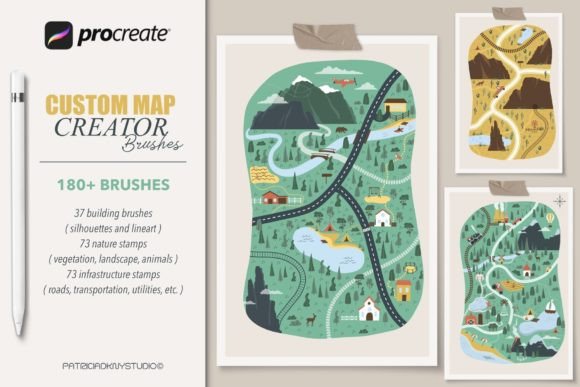
The kit is specifically engineered for the Procreate app on iPad, offering a collection of 180 unique brushes designed to make digital cartography accessible to everyone. It removes the friction usually associated with complex asset creation, allowing you to dive straight into building your personalized map illustrations. The beauty of this set lies in its simplicity; there are no complicated settings to tweak or obscure menus to navigate. You simply load the brushes, select what you need, and start stamping your way to a finished masterpiece.
Why Digital Map Makers Need Specialized Tools
When you look at professional maps in video games, books, or marketing materials, they share a common trait: consistency. Achieving that cohesive look manually requires a steady hand and a deep understanding of perspective and texture. For many creators, especially those who are not traditional artists, this barrier can be discouraging. The Custom map creator set bridges this gap by providing pre-made, hand-drawn assets that maintain a unified aesthetic.
Imagine you are working on a campaign setting for a tabletop role-playing game. You need a bustling port city, a dense forest, and a winding river system. Without specialized tools, you might spend days just getting the basic shapes right. With this brush set, you can mix and match different elements to craft landscapes, mountains, rivers, and cities in a fraction of the time. The result is a high-quality illustration that looks professionally rendered, even if you are using it for the first time.
Breaking Down the 180 Unique Brushes
The power of this kit comes from its sheer variety and organization. You aren't just getting a handful of generic stamps; you are receiving a comprehensive library of 180 hand-drawn Procreate brushes in .brushset format. These are categorized to cover the essential elements of any map:
- 37 Building City Stamp Brushes: These allow you to populate urban areas quickly. From small cottages to towering skyscrapers, these stamps let you build neighborhoods with ease, ensuring your cities feel lived-in and detailed without the need for individual line work.
- 73 Nature Landscape Stamps: Nature is the backbone of most maps. This section includes trees, bushes, rocks, and foliage that add depth and texture to your wilderness areas. They are designed to blend naturally, helping you create realistic forests, deserts, and plains.
- 73 Infrastructural Stamp Brushes: Maps need more than just buildings and trees; they need roads, bridges, walls, and pathways. These infrastructure brushes help connect your landscape, giving your map structure and guiding the viewer's eye through the terrain.
By having such a diverse range of options, you avoid the "repetitive" look that often plagues amateur maps. You can vary the placement and scale of these stamps to create organic, dynamic environments that tell a story before a single word is written.
Real-World Applications Across Industries
The utility of the Procreate Custom Map Creator Kit extends far beyond hobbyist projects. Professionals across various fields find value in having a rapid prototyping tool for visual storytelling.
For Authors and World-Builders
Writers often struggle to keep track of their fictional geographies. A map serves as a vital reference point during the writing process and adds immense value to the final published book. Using this kit, an author can quickly draft a continent, place their capital city, and mark key locations mentioned in their manuscript. The ability to iterate quickly means they can adjust borders or move landmarks as the plot evolves, keeping their vision clear and consistent.
For Game Developers and Designers
In the gaming industry, concept art is crucial for pitching ideas and planning levels. Indie developers or solo designers can use these brushes to create mood boards and preliminary level layouts. The infrastructural stamps are particularly useful for visualizing player paths and obstacles. While these maps may eventually be modeled in 3D software, starting with a 2D sketch using the Custom map creator set provides a solid foundation for the project.
For Educators and Historians
Teachers looking to engage students with history or geography lessons can create custom maps of ancient civilizations or battlefields. Instead of relying on generic stock images, educators can draw specific routes, label territories, and illustrate historical events directly on the iPad. This interactive approach makes learning more engaging and helps students visualize spatial relationships in history.
For Marketers and Content Creators
Bloggers and social media influencers often need unique visuals to stand out. A custom map can serve as a background for travel guides, adventure blogs, or fantasy-themed content. The high-resolution output from Procreate ensures these images look crisp on both mobile screens and desktop websites, enhancing the overall quality of the brand's visual identity.
Who Should Consider This Tool?
Before downloading the Procreate Custom Map Creator Kit, it is important to understand the requirements. This is not a universal tool that works across all platforms. You will need an iPad and the Procreate app installed to utilize these stamp brushes effectively. They are native to the Procreate ecosystem and will not function in Photoshop, Clip Studio Paint, or other desktop applications.
If you are already invested in the Apple ecosystem and enjoy the tactile experience of drawing on glass, this kit is a perfect fit. However, if you rely exclusively on Windows or Mac computers for your creative work, you will need to explore alternative solutions. The installation process is straightforward for iOS users: after downloading the file from Creative Fabrica, you simply click the download arrow in your browser, choose the .brushset file, and it automatically imports into Procreate. No complex extraction or conversion steps are required.
Maximizing Your Workflow
To get the most out of this resource, treat the brushes as a starting point rather than a final product. While the stamps provide excellent base layers, adding your own hand-drawn details, color adjustments, and lighting effects can elevate the map from good to exceptional. Experiment with layer opacity and blending modes in Procreate to integrate the stamps seamlessly into your background. The goal is to create a personalized illustration that feels unique to your project, using the kit as a powerful accelerator for your creative process.
Whether you are a seasoned illustrator looking to speed up your workflow or a beginner taking your first steps into digital art, the Procreate Custom Map Creator Kit offers a practical, efficient path to creating stunning cartography. By combining ease of use with professional-grade assets, it empowers creators to bring their imagined worlds to life with clarity and confidence.