Monoline Outline Brush for Procreate: A Practical Evaluation
In the realm of digital illustration and lettering, the choice of brush often dictates the final aesthetic of a project. The Monoline Outline Brush for Procreate represents a specific utility designed to streamline the creation of clean, consistent vector-like strokes within a raster-based environment. For professionals, educators, and serious hobbyists working on iPad devices, this tool addresses a common friction point in digital workflows: achieving the look of hand-drawn charm without the inconsistency of variable pressure sensitivity. This evaluation examines the practical application, technical performance, and strategic value of this brush set for creators aiming to enhance their digital canvases.
The Utility of Monoline Consistency
Monoline typography and illustration rely on strokes of uniform width. Unlike calligraphy brushes that react to pressure or tilt to create thick downstrokes and thin upstrokes, monoline tools maintain a steady diameter regardless of how hard the stylus presses against the screen. The Monoline Outline Brush for Procreate is engineered specifically to replicate this behavior. Its primary value lies in its ability to produce crisp, predictable edges, which are essential for modern graphic design, logo concepts, and UI illustrations.
For freelancers and small business owners creating assets for social media or branding materials, consistency is not merely an aesthetic preference; it is a requirement for professional presentation. When a creator uses a standard textured brush, slight variations in pressure can lead to uneven lines that require time-consuming manual correction. By utilizing a dedicated monoline outline brush, artists can focus on composition and flow rather than micro-managing stroke weight. This efficiency translates directly into faster turnaround times for client projects and more cohesive visual identities.
Analyzing the Three-Tier Structure
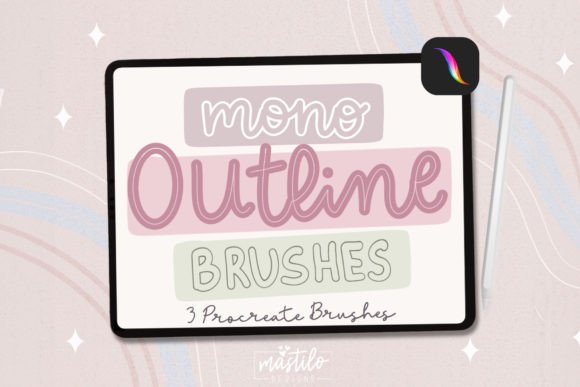
The brush pack distinguishes itself through a structured approach to line weight, offering three distinct variations: a Thin Outline Brush, a Medium Outline Brush, and a Thick Outline Brush. This segmentation is critical for effective hierarchy in design. In any piece of communication design, whether it is a blog header, an educational diagram, or a marketing flyer, the relationship between elements is defined by scale and weight.
- Thin Outline Brush: Ideal for fine details, secondary text, or delicate decorative elements. It allows for intricate work without overwhelming the composition.
- Medium Outline Brush: Serves as the workhorse for general lettering and main illustration lines. It offers enough visibility to stand out while remaining versatile enough for various contexts.
- Thick Outline Brush: Best suited for bold headlines, emphasis, or defining major shapes. It provides immediate visual impact and anchors the design.
This tripartite system eliminates the need for constant resizing of the brush tip during a session. Instead of adjusting settings repeatedly, the artist can switch between pre-configured weights that have been tuned for optimal performance. This workflow optimization is particularly valuable for entrepreneurs who may not have extensive training in digital art but need to produce high-quality graphics efficiently.
Integration and Workflow Efficiency
The practical value of the Monoline Outline Brush for Procreate extends beyond its visual output to its ease of integration into existing workflows. As a digital asset, it bypasses the logistical delays associated with physical supplies. There are no shipping costs, no risk of ink drying out, and no storage requirements. The delivery method is straightforward: users save the .brushset file from their purchase location directly to their device files.
Once the file is secured, importing it into the Procreate ecosystem is a seamless process. Users launch the app, navigate to the Brushes panel, and utilize the import function to add the new set. This immediate availability means that a creator can transition from concept to execution within minutes. For marketers and bloggers who often work under tight deadlines, this speed is a significant advantage. The ability to instantly access specialized tools ensures that creative momentum is not lost to technical setup.
Furthermore, the non-destructive nature of digital brushes allows for experimentation. If a specific line weight does not serve the intended purpose, it can be adjusted or replaced without wasting physical materials. The Monoline Outline Brush for Procreate fits into a broader strategy of asset management where digital libraries are built over time to support rapid content production.
Real-World Performance and Limitations
While the brush set excels at providing clean outlines, it is important to understand its limitations to manage expectations effectively. Because these are outline brushes, they are designed to create hollow strokes rather than filled shapes. This makes them perfect for lettering, borders, and wireframe-style illustrations. However, they are not a substitute for fill brushes or complex texture packs when solid color blocks are required.
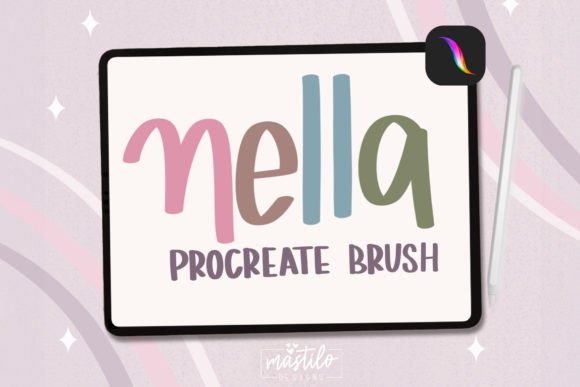
In terms of reliability, the performance depends heavily on the user's familiarity with Procreate's interface. While the import process is simple, achieving the "cute hand-drawn charm" mentioned in the product description requires a certain level of artistic control. The brush removes the variable of pressure, but it does not remove the need for steady hands or good composition skills. For beginners, there may be a learning curve in mastering the flow of the lines to ensure they look organic rather than mechanical.
Additionally, the aesthetic is specific. The "hand-drawn" quality is achieved through subtle texture or edge variation, but it will always retain a degree of digital precision. This is generally a strength for professional applications requiring scalability and clarity, but it may not satisfy artists seeking the chaotic, gritty texture of traditional charcoal or watercolor. Understanding this distinction helps users determine if the Monoline Outline Brush for Procreate aligns with their specific project goals.
Ideal Use Cases and Audience Fit
The versatility of this brush pack makes it suitable for a wide range of professionals and creatives. Educators can use the clear, legible lines to create diagrams, worksheets, and instructional materials that are easy for students to read. Bloggers and publishers can generate custom headers and pull quotes that match their brand voice without needing expensive stock photography or hiring external designers.
For entrepreneurs and small business owners, the ability to create unique lettering assets empowers them to maintain a distinct brand identity across all touchpoints. Whether designing packaging mockups, Instagram stories, or website banners, the consistent line weight ensures a polished look. The "cute hand-drawn charm" adds a human element that resonates well in markets where authenticity and approachability are valued.
Freelancers and illustrators will find the three-tier weight system particularly useful for building style guides. By having thin, medium, and thick options readily available, they can quickly prototype different layouts and present clients with varied options. The long-term value of such a resource lies in its reusability; once imported, the brushes remain part of the user's permanent toolkit, ready for future projects.
Strategic Considerations for Adoption
When deciding whether to incorporate the Monoline Outline Brush for Procreate into your workflow, consider the nature of your current projects. If your work involves heavy text, geometric shapes, or modern minimalist aesthetics, this tool is likely a high-value addition. It solves the problem of inconsistent line weights and accelerates the production of clean graphics.
However, if your primary focus is realistic rendering, photobashing, or highly textured abstract art, the utility of these specific brushes may be limited. They are specialized instruments designed for a particular outcome. Like any tool in a professional arsenal, their effectiveness is maximized when used for their intended purpose. By integrating this brush set alongside other resources, creators can build a comprehensive library that supports diverse artistic needs while maintaining efficiency and quality.
Ultimately, the decision to adopt digital assets like this brush pack should be driven by the goal of enhancing productivity and elevating the visual quality of the final output. For those looking to transform their digital canvases with precise, charming, and professional-grade lettering, the Monoline Outline Brush for Procreate offers a reliable solution that bridges the gap between technical capability and creative expression.